1. CyBOK — Cyber Security Body of Knowledge
The Cyber Security Body of Knowledge (CyBOK) is an open, freely accessible reference developed by over 115 international experts, funded by the UK National Cyber Security Programme. Just as SWEBOK organizes software engineering knowledge into well-defined areas, CyBOK does the same for cybersecurity. Version 1.1 (July 2021) defines 21 Knowledge Areas organized into 5 high-level categories.
CyBOK was created to address a fundamental problem: cybersecurity education lacked a shared, comprehensive, and academically rigorous reference. Before CyBOK, curricula varied wildly between institutions, and professionals had no single source mapping the full landscape of the discipline. The project references both IEEE SWEBOK v3.0 and the ACM Computer Science Curriculum 2013, ensuring alignment with established computing education standards.
For software engineers, understanding CyBOK is essential because security is not a separate concern — it is woven into every layer of a system. From the way you hash passwords to how you configure cloud infrastructure, security decisions happen at every stage of development. CyBOK gives us the vocabulary and framework to make those decisions intentionally rather than reactively.
CyBOK is freely available at cybok.org. All 21 Knowledge Areas can be downloaded as individual PDFs. It is mapped to the European Cybersecurity Skills Framework (ECSF) for professional development.
The 5 Categories and 21 Knowledge Areas
CyBOK organizes cybersecurity into five broad categories, each containing multiple Knowledge Areas (KAs). Understanding this structure helps you navigate the discipline and identify which areas are most relevant to your current project.
In this lesson, we focus on the Knowledge Areas most relevant to web and cloud development: Web & Mobile Security (SPS), Authentication, Authorization & Accountability (SYS), Network Security with cloud coverage (IS), Applied Cryptography (IS), and Secure Software Lifecycle (SPS).
2. OWASP Top 10 — Critical Web Security Risks
The OWASP (Open Worldwide Application Security Project) Top 10 is a standard awareness document for web application security. Updated periodically based on real-world data from hundreds of organizations, it represents the most critical security risks facing web applications. The current version (2021) reflects analysis of over 500,000 applications.
The OWASP Top 10 maps directly to the CyBOK Knowledge Area of Web & Mobile Security (SPS). Understanding these risks is not optional for web developers — it is a professional responsibility. Each risk category includes specific attack vectors, security weaknesses, and impacts that guide both prevention and detection strategies.
| Rank | Risk | Description | Impact |
|---|---|---|---|
| A01 | Broken Access Control | Users act outside intended permissions; 94% of apps tested | Unauthorized data access or modification |
| A02 | Cryptographic Failures | Weak encryption, exposed secrets, cleartext transmission | Data exposure (PII, financial) |
| A03 | Injection | SQL, NoSQL, OS command, LDAP injection via untrusted data | Data theft, full system compromise |
| A04 | Insecure Design | Missing threat modeling, insecure architecture patterns | Fundamental flaws unfixable by code |
| A05 | Security Misconfiguration | Default credentials, verbose errors, missing hardening | System takeover, data leaks |
| A06 | Vulnerable Components | Outdated libraries with known CVEs | Inherited vulnerabilities from dependencies |
| A07 | Auth Failures | Broken authentication, session management flaws | Identity theft, account takeover |
| A08 | Data Integrity Failures | Insecure CI/CD pipelines, unsigned software updates | Supply chain compromise |
| A09 | Logging & Monitoring Failures | Insufficient logging delays breach detection | Average 287 days to detect a breach |
| A10 | SSRF | Server fetches URLs from untrusted user input | Internal network scanning, cloud metadata theft |
Injection Attacks
Injection occurs when an attacker can send untrusted data to an interpreter as part of a command or query. The most common form is SQL Injection, where malicious SQL is inserted into application queries. This can bypass authentication, extract sensitive data, modify or delete database records, and in severe cases execute operating system commands.
The root cause is simple: mixing user input with code. When an application constructs a SQL query by concatenating strings from user input, the boundary between "data" and "instruction" disappears. The attacker exploits this by crafting input that changes the query's logic.
// NEVER do this — SQL Injection vulnerability
app.post('/login', (req, res) => {
  const query = `SELECT * FROM users
    WHERE email = '${req.body.email}'
    AND password = '${req.body.password}'`;
  db.query(query);  // Attacker input: ' OR '1'='1' --
});// ALWAYS use parameterized queries
app.post('/login', (req, res) => {
const query = 'SELECT * FROM users WHERE email = $1 AND password = $2';
const values = [req.body.email, req.body.password];
db.query(query, values); // Safe! Input treated as data, never as SQL
});Never construct queries by string concatenation with user input. Use parameterized queries (prepared statements) in every language: $1, $2 in PostgreSQL, ? in MySQL, @param in SQL Server. ORMs like Sequelize and Prisma do this automatically — but beware of raw query escape hatches.
XSS & CSRF
Cross-Site Scripting (XSS) allows an attacker to inject malicious JavaScript into web pages viewed by other users. There are three types: Stored XSS (script persisted in the database), Reflected XSS (script bounced off the server via URL parameters), and DOM-based XSS (script injected through client-side JavaScript manipulation).
The defense against XSS is layered. First, always encode output — use textContent instead of innerHTML, and use template engines that auto-escape by default. Second, deploy a Content Security Policy (CSP) header that restricts which scripts the browser can execute. Third, validate and sanitize all input, but remember that output encoding is the primary defense.
Cross-Site Request Forgery (CSRF) tricks an authenticated user into submitting unintended requests. Because browsers automatically attach cookies to requests, an attacker can craft a malicious page that triggers actions on a site where the user is logged in. Defenses include CSRF tokens (unique per session/request), SameSite cookie attribute, and verifying the Origin header on state-changing requests.
3. Authentication & Authorization
The CyBOK Knowledge Area Authentication, Authorization & Accountability (AAA) covers the three pillars of access control. Authentication answers "who are you?", authorization answers "what are you allowed to do?", and accountability ensures that actions can be traced back to the actor. These are distinct concerns and must be treated separately in your architecture.
A common and dangerous mistake is conflating authentication with authorization. A user who successfully authenticates (proves their identity) does not automatically have permission to access any resource. Every protected endpoint must independently verify both that the user is who they claim to be AND that they have the necessary permissions for the specific action requested.
| Aspect | Authentication (AuthN) | Authorization (AuthZ) |
|---|---|---|
| Question | Who are you? | What can you do? |
| Mechanism | Passwords, MFA, OAuth, Biometrics | RBAC, ABAC, Policies, ACLs |
| Principle | Identity verification | Least privilege |
| Failure mode | Impersonation, account takeover | Privilege escalation, data breach |
| Where enforced | Auth server / identity provider | Every API endpoint, server-side |
Password Security
Passwords remain the most common authentication mechanism, but they must be handled with extreme care. The fundamental rule is: never store passwords in plaintext or encrypted form. Passwords must be hashed using a purpose-built algorithm that is deliberately slow and salted.
The recommended algorithms are bcrypt and Argon2. Both are designed to be computationally expensive, making brute-force attacks impractical. bcrypt includes a built-in salt and a configurable cost factor. Argon2 (winner of the Password Hashing Competition in 2015) adds memory-hardness, making it resistant to GPU-based attacks.
const bcrypt = require('bcrypt');

// Hashing a password (registration)
const saltRounds = 12;  // cost factor — higher = slower = safer
const hash = await bcrypt.hash(password, saltRounds);
// Store `hash` in database — never the plaintext password

// Verifying a password (login)
const isValid = await bcrypt.compare(inputPassword, storedHash);
if (!isValid) throw new Error('Invalid credentials');Never use MD5 or SHA-256 for password hashing. These are general-purpose hash functions designed to be fast — which is the opposite of what you want for passwords. An attacker with a GPU can test billions of SHA-256 hashes per second, but only thousands of bcrypt hashes.
JWT & OAuth 2.0
JSON Web Tokens (JWT) are a compact, URL-safe format for transmitting claims between parties. A JWT consists of three Base64URL-encoded parts separated by dots: header.payload.signature. The header specifies the algorithm (e.g., HS256 or RS256), the payload contains claims (user ID, roles, expiration), and the signature ensures the token has not been tampered with.
JWTs are stateless — the server does not need to store session data. This makes them ideal for distributed systems and microservices. However, statelessness comes with a tradeoff: you cannot easily revoke a JWT before it expires. Mitigation strategies include short expiration times, token blacklists, and refresh token rotation.
OAuth 2.0 is an authorization framework (not an authentication protocol) that enables third-party applications to obtain limited access to a user's resources. OpenID Connect (OIDC) is an identity layer built on top of OAuth 2.0 that adds authentication. For mobile applications, the recommended flow is Authorization Code with PKCE (Proof Key for Code Exchange), which protects against authorization code interception.
Never store JWT tokens in localStorage — it is accessible to any JavaScript on the page (XSS vector). Use httpOnly cookies with Secure and SameSite=Strict attributes, or platform-specific secure storage on mobile.
4. Cryptography
The CyBOK Knowledge Areas on Cryptography and Applied Cryptography cover the mathematical foundations and practical implementation of data protection. For web and cloud developers, the key concept is protecting data in two states: in transit (moving across networks) and at rest (stored on disk or in databases).
There are three fundamental cryptographic operations that every developer should understand: symmetric encryption (same key for encrypt/decrypt, e.g., AES-256), asymmetric encryption (public/private key pair, e.g., RSA, ECDSA), and hashing (one-way transformation, e.g., SHA-256, bcrypt). Each serves a different purpose, and using the wrong one can create severe vulnerabilities.
| Type | Algorithm | Use Case | Key Property |
|---|---|---|---|
| Symmetric | AES-256-GCM | Data at rest, disk encryption | Fast, single shared key |
| Asymmetric | RSA-2048, ECDSA | TLS handshake, digital signatures | Public + private key pair |
| Hashing | SHA-256, SHA-3 | Data integrity, checksums | One-way, deterministic |
| Password Hashing | bcrypt, Argon2 | Password storage | One-way, slow, salted |
TLS & HTTPS
Transport Layer Security (TLS) is the protocol that provides encryption for data in transit. When you see HTTPS in a URL, the connection is protected by TLS. The current version, TLS 1.3 (2018), simplified the handshake to a single round trip, removed insecure cipher suites, and mandates Perfect Forward Secrecy (PFS) — meaning that even if the server's private key is compromised in the future, past communications remain protected.
Every API endpoint, every web application, every microservice communication must use HTTPS. There are no exceptions. The HSTS (HTTP Strict Transport Security) header tells browsers to always use HTTPS for your domain, preventing SSL stripping attacks. Certificate management should be automated using services like Let's Encrypt or your cloud provider's certificate manager.
Hashing vs Encryption
A critical distinction: encryption is reversible (given the key, you can recover the original data), while hashing is one-way (you cannot recover the original data from the hash). This distinction matters enormously for passwords. If passwords are encrypted, anyone with the encryption key can read all passwords. If passwords are hashed, even the system administrator cannot recover them — verification works by hashing the input and comparing the result.
Use encryption (AES-256) for data you need to read later (credit card numbers, personal documents). Use hashing (bcrypt/Argon2) for data you only need to verify (passwords). Use cryptographic signatures (RSA/ECDSA) for data you need to prove is authentic and unmodified (JWT tokens, software updates).
5. Cloud Security
The CyBOK Knowledge Area on Network Security includes extensive coverage of cloud and data center security. The fundamental concept is the Shared Responsibility Model: the cloud provider (AWS, GCP, Azure) is responsible for security of the cloud (physical infrastructure, hypervisor, network fabric), while the customer is responsible for security in the cloud (data, identity, application configuration, encryption keys).
Misconfiguration is the leading cause of cloud security breaches, not sophisticated hacking. Public S3 buckets, overly permissive IAM roles, hardcoded credentials in Git repositories, and wide-open security groups account for the vast majority of cloud incidents. These are configuration errors, not code vulnerabilities — and they are entirely preventable.
Understanding where the boundary lies is critical. If your database is exposed because you put it in a public subnet with an open security group, that is your responsibility, not AWS's. If there is a hypervisor vulnerability that allows cross-tenant access, that is AWS's responsibility. The model shifts slightly depending on the service type: IaaS (you manage most), PaaS (shared), SaaS (provider manages most).
Shared Responsibility in Practice
IAM & Least Privilege
The principle of least privilege states that every user, service, and process should have only the minimum permissions necessary to perform its function. In cloud environments, this is enforced through Identity and Access Management (IAM) policies.
Common mistakes include using the root account for daily operations, granting *:* (full access) policies to development accounts, sharing credentials between services, and not rotating access keys. Every service should have its own IAM role with narrowly scoped permissions, and credentials should be managed through dedicated secret management solutions like AWS Secrets Manager, HashiCorp Vault, or environment variables injected at deploy time.
{
  "Version": "2012-10-17",
  "Statement": [{
    "Effect": "Allow",
    "Action": [
      "s3:GetObject",
      "s3:PutObject"
    ],
    "Resource": "arn:aws:s3:::my-app-uploads/*"
  }]
}Never use "Action": "*" or "Resource": "*" in production IAM policies. Always scope permissions to the specific actions and resources needed. A compromised service with broad permissions becomes a gateway to your entire infrastructure.
6. DevSecOps — Security in the Development Pipeline
The CyBOK Knowledge Area on Secure Software Lifecycle (SPS) emphasizes that security must be integrated throughout the development process, not bolted on at the end. DevSecOps extends the DevOps philosophy by embedding security practices into every stage of the CI/CD pipeline. The goal is to "shift left" — finding and fixing vulnerabilities earlier, when they are cheaper and easier to address.
Research consistently shows that bugs found during the design phase cost roughly 6x less to fix than bugs found in production. Security vulnerabilities follow the same pattern. A SQL injection caught by a static analysis tool during code review takes minutes to fix. The same vulnerability discovered after a data breach can cost millions in remediation, legal liability, and reputation damage.
The DevSecOps pipeline includes several automated security tools at different stages. During coding, SAST (Static Application Security Testing) tools like SonarQube and Semgrep analyze source code for known vulnerability patterns. During the build phase, SCA (Software Composition Analysis) tools like npm audit and Snyk check dependencies for known CVEs and generate a Software Bill of Materials (SBOM). During testing, DAST (Dynamic Application Security Testing) tools like OWASP ZAP test the running application for vulnerabilities. In production, WAFs (Web Application Firewalls) and SIEM systems provide continuous monitoring.
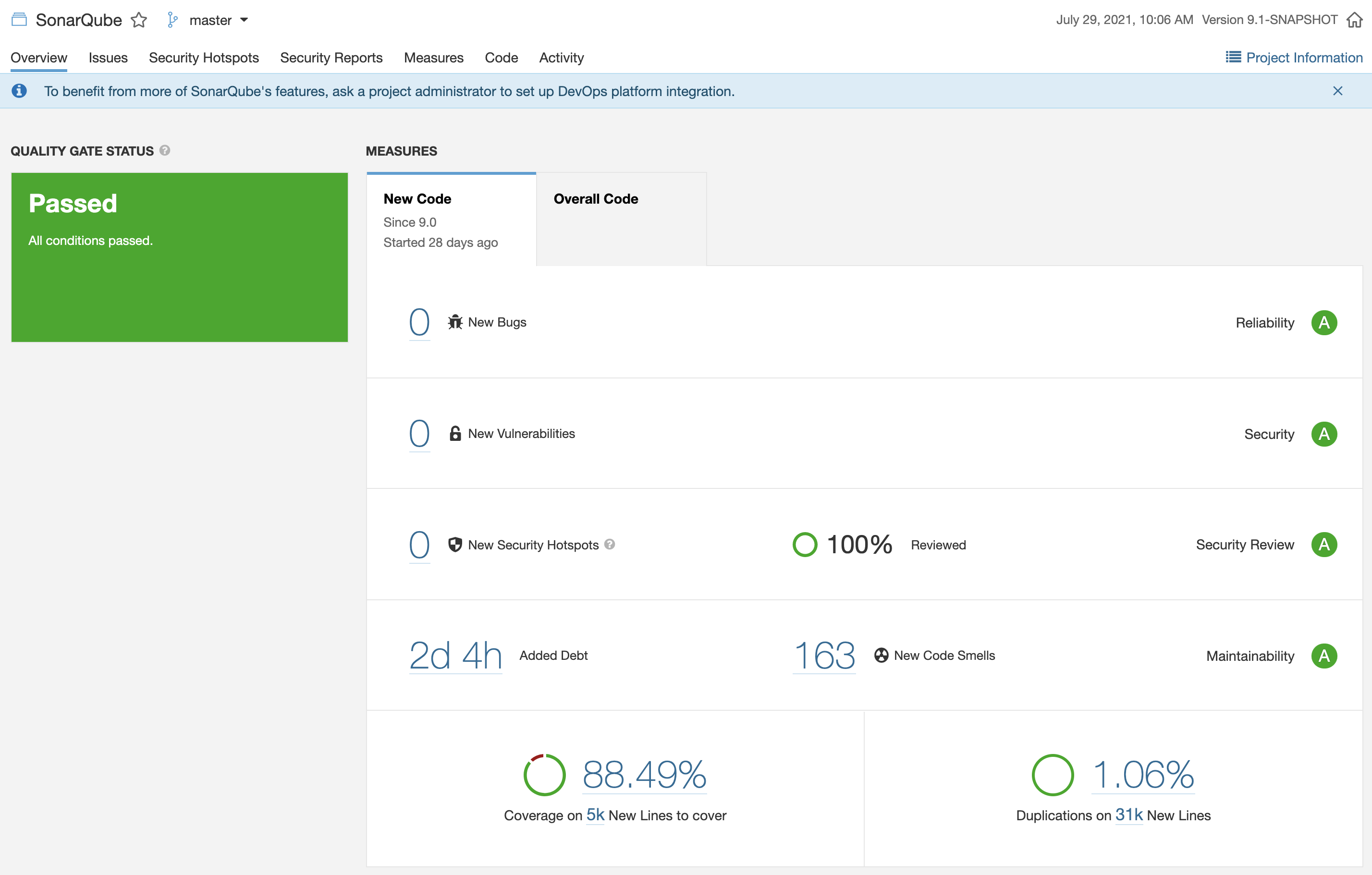
SonarQube — SAST dashboard with vulnerability detection, code smells, and coverage metrics.
Shift Left in Practice
# Pre-commit: lint and SAST
npx eslint --ext .js,.ts src/
npx semgrep --config auto src/

# Build: dependency audit
npm audit --production
npx snyk test

# Test: DAST against staging
docker run owasp/zap2docker-stable zap-baseline.py \
  -t https://staging.myapp.com

# Deploy: infrastructure scan
tfsec ./terraform/
trivy image myapp:latest
7. HTTP Security Headers
Security headers are HTTP response headers that instruct the browser to enable specific security features. They are one of the simplest and most effective defenses against common web attacks. Configuring them correctly can prevent entire categories of attacks (XSS, clickjacking, MIME sniffing) with minimal development effort.
The most important headers are: Content-Security-Policy (CSP) which controls which resources the browser can load, effectively neutralizing most XSS attacks; Strict-Transport-Security (HSTS) which forces HTTPS for all future requests; X-Content-Type-Options which prevents MIME type sniffing; and X-Frame-Options which prevents clickjacking by controlling whether your page can be embedded in iframes.
# Content Security Policy — strongest XSS defense
add_header Content-Security-Policy
  "default-src 'self'; script-src 'self'; style-src 'self' 'unsafe-inline'";

# Force HTTPS for 1 year, include subdomains
add_header Strict-Transport-Security
  "max-age=31536000; includeSubDomains; preload";

# Prevent MIME type sniffing
add_header X-Content-Type-Options "nosniff";

# Prevent clickjacking
add_header X-Frame-Options "DENY";

# Control referrer information
add_header Referrer-Policy "strict-origin-when-cross-origin";You can audit your application's security headers using securityheaders.com. It scans your site and grades each header from A+ to F. Aim for at least an A grade before deploying to production.
8. Backend for Frontend (BFF) — Security and SEO
The Backend for Frontend (BFF) pattern introduces a dedicated server-side layer between the client application (browser, mobile) and the backend microservices. Instead of the browser calling multiple APIs directly, a BFF server aggregates, transforms, and delivers data tailored to the specific frontend's needs. This pattern, popularized by Sam Newman and widely adopted at companies like Netflix, Spotify, and SoundCloud, has significant implications for both security and SEO.
In a traditional SPA (Single Page Application) architecture, the browser receives a minimal HTML shell and relies on JavaScript to fetch data from APIs and render content client-side. This creates two fundamental problems: search engines may not index JavaScript-rendered content effectively, and the browser becomes a trusted client that handles API keys, tokens, and business logic — all of which are exposed in the browser's DevTools.
BFF and Security
The BFF pattern provides several security advantages that map directly to CyBOK Knowledge Areas on Web & Mobile Security and Authentication, Authorization & Accountability:
1. Secrets never reach the browser. API keys, service tokens, and credentials for internal microservices are stored on the BFF server. The browser never sees them. In a traditional SPA, API keys embedded in JavaScript bundles are trivially extractable — even "hidden" in environment variables at build time, they end up in the final bundle. With a BFF, the browser communicates only with the BFF, and the BFF communicates with internal services using credentials stored securely on the server.
2. Reduced attack surface. Instead of exposing multiple microservice endpoints to the public internet, only the BFF is publicly accessible. Internal services can live in private subnets with no public IP addresses. This follows the principle of least exposure — if an attacker cannot reach a service, they cannot exploit it.
3. Centralized authentication and authorization. The BFF becomes a single enforcement point for session management, token validation, and access control. It can handle OAuth flows, validate JWTs, enforce CSRF protection, and manage secure cookies (httpOnly, SameSite, Secure) — all in one place rather than scattered across multiple client-side implementations.
4. Input validation and output sanitization. The BFF can validate and sanitize all incoming requests before forwarding them to internal services, and sanitize all outgoing responses before sending them to the browser. This creates a security boundary that protects both sides.
const express = require('express');
const app = express();

// Secrets stay on the server — never sent to the browser
const INTERNAL_API_KEY = process.env.INTERNAL_API_KEY;
const PAYMENT_SERVICE = 'http://payment.internal:3001'; // private subnet

// BFF aggregates multiple internal APIs into one response
app.get('/api/dashboard', authMiddleware, async (req, res) => {
  // Browser only calls the BFF — never internal services
  const [user, orders, notifications] = await Promise.all([
    fetch('http://users.internal:3002/me', {
      headers: { 'X-API-Key': INTERNAL_API_KEY }  // secret stays server-side
    }),
    fetch(`http://orders.internal:3003/user/${req.userId}`, {
      headers: { 'X-API-Key': INTERNAL_API_KEY }
    }),
    fetch(`http://notifications.internal:3004/user/${req.userId}`, {
      headers: { 'X-API-Key': INTERNAL_API_KEY }
    })
  ]);
  // Return only what the frontend needs — no internal details leaked
  res.json({ user, orders, notifications });
});In a SPA without BFF, if you use fetch('https://api.stripe.com/...', { headers: { Authorization: 'sk_live_...' } }) from the browser, your secret key is visible to anyone who opens DevTools. A BFF eliminates this entire class of vulnerability by keeping all service-to-service communication server-side.
BFF and SEO
Search Engine Optimization depends on search engine crawlers being able to read and index your page content. While Google's crawler can execute JavaScript (using a headless Chromium instance), it does so with significant limitations: there is a rendering delay (sometimes days), a computational budget per page, and pages that fail to render within the budget are indexed with their empty HTML shell. Other search engines (Bing, DuckDuckGo, Baidu) have even less JavaScript rendering capability.
A BFF enables Server-Side Rendering (SSR) — the server generates complete HTML before sending it to the browser. This means:
| Aspect | SPA (Client-Side Rendering) | BFF with SSR |
|---|---|---|
| Initial HTML | Empty <div id="root"></div> | Full content rendered in HTML |
| Crawler indexing | Depends on JS execution (unreliable) | Immediate — content is in the HTML |
| Time to First Byte | Fast (empty shell) | Slightly slower, but meaningful content |
| First Contentful Paint | Slow (download JS, fetch API, render) | Fast (HTML already has content) |
| Meta tags / Open Graph | Static or requires prerendering | Dynamic, per-page, server-generated |
| Social media previews | Often broken (crawlers don't run JS) | Correct titles, descriptions, images |
| Core Web Vitals (LCP) | Penalized by slow rendering | Improved — content arrives in first response |
Dynamic meta tags are a particularly important benefit. When a user shares a product page on social media, the platform's crawler fetches the URL and reads the <meta> tags (og:title, og:description, og:image) to generate a preview card. If these tags are rendered by JavaScript, the crawler will not see them. A BFF can generate the correct meta tags server-side for every page, ensuring that shared links display properly on Twitter, LinkedIn, WhatsApp, and other platforms.
// BFF route that renders HTML with SEO meta tags
app.get('/products/:id', async (req, res) => {
  const product = await fetch(
    `http://catalog.internal:3005/products/${req.params.id}`,
    { headers: { 'X-API-Key': INTERNAL_API_KEY } }
  ).then(r => r.json());

  // Server generates full HTML — crawlers see real content
  res.send(`<!DOCTYPE html>
    <html>
    <head>
      <title>${product.name} | My Store</title>
      <meta name="description" content="${product.description}">
      <meta property="og:title" content="${product.name}">
      <meta property="og:image" content="${product.imageUrl}">
    </head>
    <body>
      <h1>${product.name}</h1>
      <p>${product.description}</p>
      <p>Price: $${product.price}</p>
    </body>
    </html>`);
});Modern frameworks like Next.js (React), Nuxt (Vue), and SvelteKit implement the BFF pattern natively. Their server-side functions (getServerSideProps, server loaders) act as a BFF layer: they fetch data from internal APIs on the server, render HTML for SEO, and keep secrets out of the browser — all without you having to build a separate BFF service.
A BFF adds a server layer, which means more infrastructure to manage (deployment, scaling, monitoring). For simple public sites with no sensitive APIs, a static site generator (SSG) may provide SEO benefits without the complexity. Use a BFF when you have: (1) sensitive API keys or internal services to protect, (2) dynamic content that must be indexed, or (3) multiple frontends (web, mobile, TV) that need different API shapes.
9. RM-ODP — Security Across Viewpoints
The RM-ODP (Reference Model for Open Distributed Processing) framework provides five viewpoints for analyzing distributed systems. Security is a cross-cutting concern that appears in every viewpoint. Here is how security maps to each perspective in the context of a web/cloud application:
| Viewpoint | Security Concern | Example in Our Project |
|---|---|---|
| Enterprise | Security policies, compliance, risk appetite | LGPD/GDPR compliance, data classification policy |
| Information | Data sensitivity, access levels, encryption needs | PII encrypted at rest, role-based data access |
| Computational | Authentication at service boundaries, input validation | JWT validation middleware, parameterized queries |
| Engineering | Network segmentation, TLS, secrets management | Private subnets, HTTPS everywhere, vault for secrets |
| Technology | Platform hardening, dependency updates, security headers | Node.js security patches, npm audit, CSP headers |
The Engineering viewpoint is where most cloud security decisions live: VPC design, security groups, IAM roles, TLS termination, and container isolation. But without the Enterprise viewpoint (knowing what data is sensitive and what regulations apply), your Engineering decisions lack context. Security architecture must be driven top-down from business requirements.
10. Security Checklist
Use this interactive checklist to verify that your project implements the essential security controls covered in this lesson. Click each item to mark it as completed.
Application Security
- All user inputs validated and sanitized server-side
- Parameterized queries for all database access (no string concatenation)
- Output encoding applied to prevent XSS
- CSRF tokens on all state-changing requests
- Security headers configured (CSP, HSTS, X-Frame-Options)
- Dependencies scanned for known vulnerabilities (npm audit)
Authentication & Encryption
- Passwords hashed with bcrypt (cost 12+) or Argon2
- JWT tokens with short expiration and proper signing
- Tokens stored in httpOnly cookies, not localStorage
- HTTPS enforced on all endpoints (no HTTP fallback)
- Sensitive data encrypted at rest (AES-256)
Cloud & Infrastructure
- IAM policies follow least privilege principle
- Secrets stored in vault/env vars, never in code
- Databases in private subnets only
- Audit logging enabled (CloudTrail or equivalent)
- Security groups scoped to minimum required ports
- Root/admin account protected with MFA